Guys! For those of you who have often finished the campaign of Command & Conquer: Red Alert 2 & Yuri’s Revenge, I’m sure you must be a little boring with the game’s speed which is too slow. By default the speed control slider menu is not there while the gameplay, but you can easily Enable it! Just follow my easy tutorial and it’s guaranteed to be 100% work!
For an example the Game Speed Control (slider) into Faster or Fastest on my gameplay:
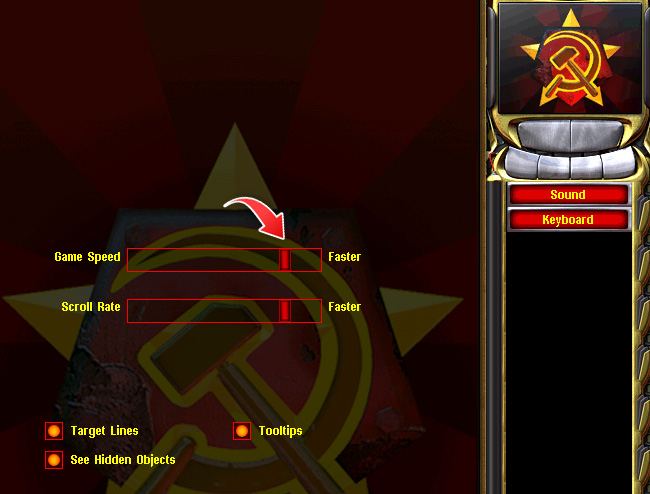
How to Enable Game Speed Control in Command & Conquer: Red Alert 2 & Yuri’s Revenge
1. You need go to your main game folder, then make each shortcut for your RA2 & Yuri game:
Right click on each .exe file → Create Shortcut
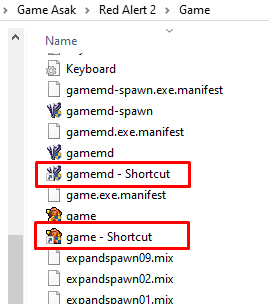
2. Right click on each game shortcut → select Properties → then rename each file by adding:
-speedcontrol in the end → OK.
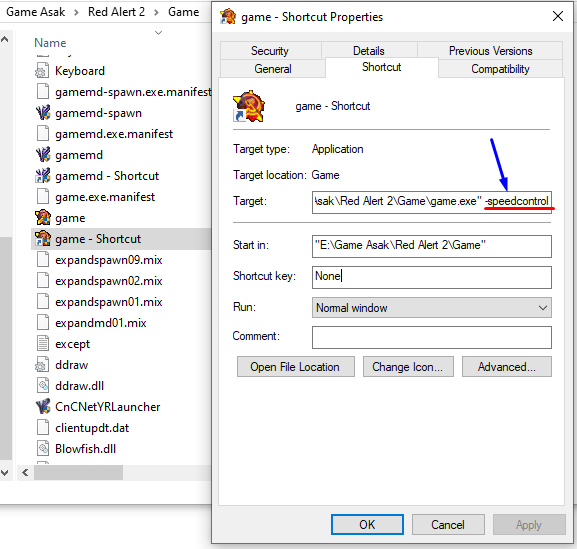
3. The last step is Run the game by launching via your Shortcut only. Enjoy Kirov Reporting in…!
Note: If you still don’t understand, watch the video below:

AUTHOR BIO
On my daily job, I am a software engineer, programmer & computer technician. My passion is assembling PC hardware, studying Operating System and all things related to computers technology. I also love to make short films for YouTube as a producer. More at about me…