To increase the business and revenue growth of the influencers, Roblox seems to provide the Video Stars Program. Roblox players can use the Star Code when purchasing Robux to support your favorite Video Stars at no additional cost to you.
You can donate a certain amount of Robux to Roblox content creators using Star Code. You can decide how much Robux you want to donate to the Roblox content creator. If you have a plan to donate 1000 Robux for content creators, how much Robux do you need to purchase? So, let’s find out the information about it below!
How Much Robux Do You Need to Purchase to Donate for 1000 Robux?
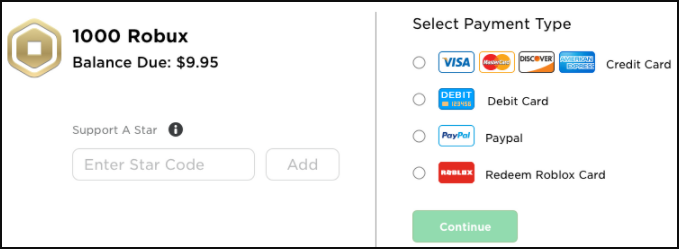
Through Video Stars Program, you will be able to support a content creator when making a purchase for Robux. Donating Robux will send them about 5% of your purchase without you spending anything extra.
In Roblox, you can really help Roblox content creators by donating them to Robux, especially if you are a super fan of any influencer. However, this is only applicable for those who participate in the Video Stars Program that has some high criteria.
If you want to donate 1000 Robux to your favorite influencer, you have to count first how much Robux you should purchase, as they will get 5% of your Robux purchase. The highest value packs of Robux that you can buy is 10,000 Robux.
Assuming you buy the highest value packs of Robux, 10,000 Robux and you want to support your favorite content creator. You can then count how much Robux they will get if you purchase 10,000 Robux, provided they will get 5% of your purchase. So, here’s for the explanation:
- Robux you purchase: 10,000
- Robux a content creator will receive: 5% of your purchase
So, we can count: 10,000 Robux x 5% = 500
If you purchase the highest value pack of Robux, that’s 10,000 Robux, you can just donate your favorite influencer around 500 Robux. To give them 1,000 Robux, you can double purchase the highest value pack of Robux, as follow:
- 10,000 x 5% = 500 Robux
- 20,000 x 5% = 1,000 Robux
So, if you want to donate your favorite content creator for 1,000 Robux, you need to purchase 20,000 Robux. Well, you need to spend around $200 to buy 20,000 Robux, as 10,000 Robux costs $99.99.
How to Use the Roblox Star Code?
The Roblox Star Code is a special code available in the Roblox Video Stars Program. If you use a Star Code to support a Video Star, they will automatically receive 5% of the Robux you buy through Roblox website.
However, you will still receive the full amount of Robux that you paid for with the added bonus of knowing that you have contributed to your favorite Roblox influencer. Keep in mind, you can only use Star Code when purchasing Roblox on the Roblox website and on the Roblox App.
If you want to use Star Code, you just simply enter the Star Code associated with your favorite Roblox influencer on the purchase page while completing your transaction. The Roblox content creators will then be promoting their Star Codes on their Roblox profile or group pages, as well as on their social media such as Twitter, YouTube and more.
Here’s how to use Roblox Star Code:
Method 1: Through a browser
- First, you need to go to the Robux page here.
- Once you are at the Robux page, you can then choose the Robux value pack that you want to buy.
- Then, you will be taken into the payment method selection page.
- You can then choose ‘Click Here’ to show the code entry window.
- Before you open the code window, make sure you have your favorite Roblox influencer code on your hand.
- Then, enter the Star Code on the available code bar and then click the ‘Add’ button.
- If the code is accepted, the next page will show the person you’re supporting.
Method 2: Through Roblox app
- First, open the Roblox app and go to the Membership page.
- You can then scroll to near the end of the page to find the Star Code field.
- After that, you can click the ‘Tap Here’ to open the code entry window.
- Then, enter your favorite Star Code on the available bar and then click the ‘Add’ button.
- If the code is accepted, the next page will show the person you’re supporting.
After you have added your code through a web browser or the app, the code will be saved for around 2 weeks, so that you do not have to re-enter the code each time when you are making a purchase.
Here’s a List of Star Codes for March 2025!
To ease you finding your favorite Star Code, we’ll also give you a list of Star Codes available in March 2025. Here they are:
| 3SB Games: 3sb | ItzVexo: ItzVexo | Robstix: robstix |
| AlvinBlox: AlvinBlox | Jackeryz: Jack | RODNY_ROBLOX: RODNY |
| AmberryYT: Amberry | Jake Globox: Globox | Roof: roof |
| Anyx: Anix | Janet and Kate: TeamJK | RussoPlays: Russo |
| Annoying Orange Gaming: TootyFruit | Jayingee: Jake | ryguyrocky: Ryguyrocky |
| Ant: Ant | J-Bug: jbug | SallyGreenGamer: SallyGreen |
| Ant Antixx: Antixx | JD: JD | Seedeng: See |
| Ashleyosity: Funneh | Jenstine: jenstine | SeerRblx: seer |
| AshleyTheUnicorn: Unicorn | jeruhmi: cat | Seniac: Seniac |
| Axiore: axiore | jessetc: Jesse | Senior: Senior |
| bandi: Bandi | Jie GamingStudio: JIE | SGC_Shane: ShanePlays |
| Bandites: Bandites | Kaden Fumblebottom: Kaden | SharkBL0X: SharkBlox |
| BereghostGames: TheFGNCrew | Kavra: Kavra | Signicial: Signicial |
| Betroner: BYN | Kawaii Kunicorn: Kunicorn | Sketch: Sketch |
| bigbst4tz2: BIGB2 | Keisyo: cat | skyleree: Sky |
| BIGHEAD: bighead | KepuTheCat: Kepu | Sleghart: sleghart |
| Blue Blob: BLOB | Kelvingts: Kelvin | Squid Magic: squid |
| BlueBug: Blue | Kindly Keyin Star: Keyin | Smurfzin: smurf |
| Bubbles: bubbles | KraoESp: KraoESp | SnowRBX: snow |
| Buur: Buur | KreekCraft: RealKreek | Sons of Fun: sons |
| BrampP: bramP | KrystinPlays: Krystin | Sopo Squad Gaming: sopo |
| CaptainTate21: Captain | L0GinHDi: LOGinHDi | Soy Blue: azul |
| Cari: Cari | LaniRoblox: LANI | Straw: Straw |
| Chrisandthemike: Christmas | LankyBox: LankyBox | StronbolYT: Stronbol |
| Cookie Cutter: CANDY | Laughability: Laugh | Sub’s Blox World: Sub |
| Conor3D: Conor3D | Landon: ARKH: Quack | Super Dog Tyler: super |
| CQQP: cqqp | LazarBeam LAZAR | SunsetSafari: SUNSET |
| CraftedRL: Crafted | Leah Ashe: LeahAshe | S_Viper: viper |
| Craxel: craxel | LegolazYoutube: Legolaz Youtube | TanqR: TanqR |
| Cryptize: cryptize | Linkmon99: Linkmon99 | TBNRwife: Brianna |
| Cybernova Games: Cybernova | Lonnie: Lonnie | Telanthric: Telanthric |
| DeeterPlays: DeeterPlays | Luky: Luky | Temptrist: Temptrist |
| DefildPlays: Defiled | MatrixPlaysRB: Matrix | Terabrite Games: Brite |
| Denis: Denis | Manucraft: manucraft | TheEvilShark: animal |
| Dessi: Dessi | mayrushart: mayrushart | The Frustrated Gamer: TFG |
| DimerDillion: Dimer | MeganPlays: MeganPlays | The Meg and Mo Show: MEGA |
| DOLLASTIC PLAYS!: Dollastic | MicroGuardian: Micro | The Monkey: Monkey |
| DV Plays: DV | MK: mk | therealcybernova: Cybernova |
| elitelupus: elite | MoFlare: Moflare | TheRoPo: RopoRoblox |
| Evanbear1: EB1 | MuneebParwazMP: Muneeb | Thumbs Up Family: TUFGAMING |
| Emperador: EmperadorMaxiYT | MyUsernamesThis: Bacon | Thinknoodles: Noodles |
| FancySmash: Fancy | NapkinNate: Napkin | ThnxCya: ThnxCya |
| FakerUp: fakerup | Night_foxx: NightFoxx | Tigre TV: tigretv |
| FGTeeV: FGTEEV | Noangy: BYN | Tofu: Tofu |
| Fishy: Fishy | NO_DATA: purple | Tooquick: Tooquick |
| Flamingo: Flamingo | NotThnxCya: ThnxCya | ToyHeroesMolly: Toyheroes |
| Flexer97YT: Otaku | ObliviousHD: Oblivious | Turtles Wear Raincoats: turtle |
| Fnatic: iifnatik | okgamerman: Playonyx | TussyGames: Tussy |
| FunkySquad413: Funky | Oscar: Oscar | TwiistedPandora: Twiisted |
| FunnyBunny: bunny | Pankayz: Pankayz | Unicorn Twins: PIZZA |
| Fuzz: Fuzz | PeetahBread: Peetah | VeD_DeV: VeDDeV |
| GallantGaming: Gallant | PGHLFilms: PGHLFilms | xdarzethx: Gremlins |
| Gamer Kawaii: kawaii | PiggyMasterZ: PMZ | Z_Nac: Znac |
| GamingMermaid: Mermaid | Poke: Poke | Z00LD: Z00LDYT |
| GamingWithKev: GWKFamily | PremiumSalad: Premium | ZacharyZaxor: Zach |
| GH0KS: GH0KS | PrestonMobile: Preston | Zerophyx: zerophyx |
| GoingLimited: GOING | PREZLEY: prezley | ZephPlayz: ZephPlayz |
| gorygaming24601: Gory | Proton Plays Roblox: proton | |
| GraserPlays: graser | Raconidas: Raconidas | |
| Gravycatman: Gravy | Rainway: Rainway | |
| heysant2018: HeySant | RazorFishGaming: Razor | |
| HappyBlack: happyblack | Realistic_GamingMC95: Realistic | |
| Hyper: Hyper | Realrosesarered: Realroses | |
| iamSanna: iamSanna | RealSubZeroExtabyte: Subzero | |
| ibemaine: IBeMaine | Rektway: rektway | |
| ImaGamerGirl: gamergirl | Rell Games: Rell |

AUTHOR BIO
On my daily job, I am a software engineer, programmer & computer technician. My passion is assembling PC hardware, studying Operating System and all things related to computers technology. I also love to make short films for YouTube as a producer. More at about me…
![Roblox Greenville [Auto Farm] Scripts](https://www.alfintechcomputer.com/wp-content/uploads/2025/08/Roblox-Greenville-Auto-Farm-Scripts-450x240.jpg)


![Roblox Universal Script [Noclip]](https://www.alfintechcomputer.com/wp-content/uploads/2025/03/Roblox-Universal-Script-Noclip-450x240.jpg)